Examples
Realistic scenarios showing how AI assistants use MCP Server Mattermost. Each example is a single prompt — the AI decides which tools to call and how to format the result.
Deployment Status Summary
"Check #ops for today's deployment messages and post a summary to #engineering"
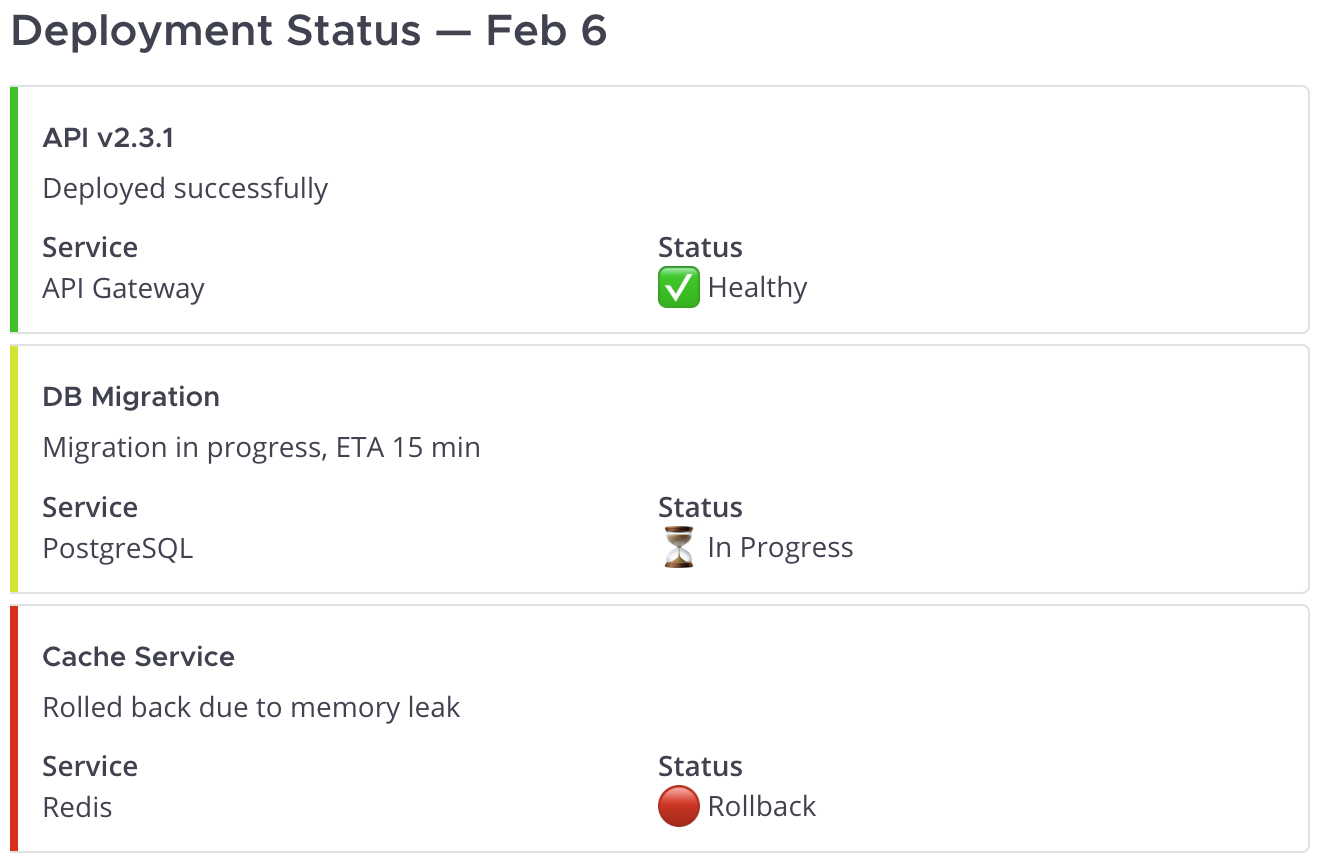
The AI reads recent messages from #ops, identifies deployment-related updates, and posts a structured summary to #engineering with color-coded status:
How it works
Tools used:
get_channel_by_name— find #ops channelget_channel_messages— read recent messagespost_message— post summary to #engineering with attachments
Example attachment payload:
{
  "channel_id": "engineering-channel-id",
  "message": "",
  "attachments": [
    {
      "color": "good",
      "title": "API v2.3.1",
      "text": "Deployed successfully",
      "fields": [
        {"title": "Service", "value": "API Gateway", "short": true},
        {"title": "Status", "value": "Healthy", "short": true}
      ]
    },
    {
      "color": "warning",
      "title": "DB Migration",
      "text": "Migration in progress, ETA 15 min",
      "fields": [
        {"title": "Service", "value": "PostgreSQL", "short": true},
        {"title": "Status", "value": "In Progress", "short": true}
      ]
    },
    {
      "color": "danger",
      "title": "Cache Service",
      "text": "Rolled back due to memory leak",
      "fields": [
        {"title": "Service", "value": "Redis", "short": true},
        {"title": "Status", "value": "Rollback", "short": true}
      ]
    }
  ]
}
Unanswered Questions Report
"Find unanswered questions in #support from this week and post a summary for the team"
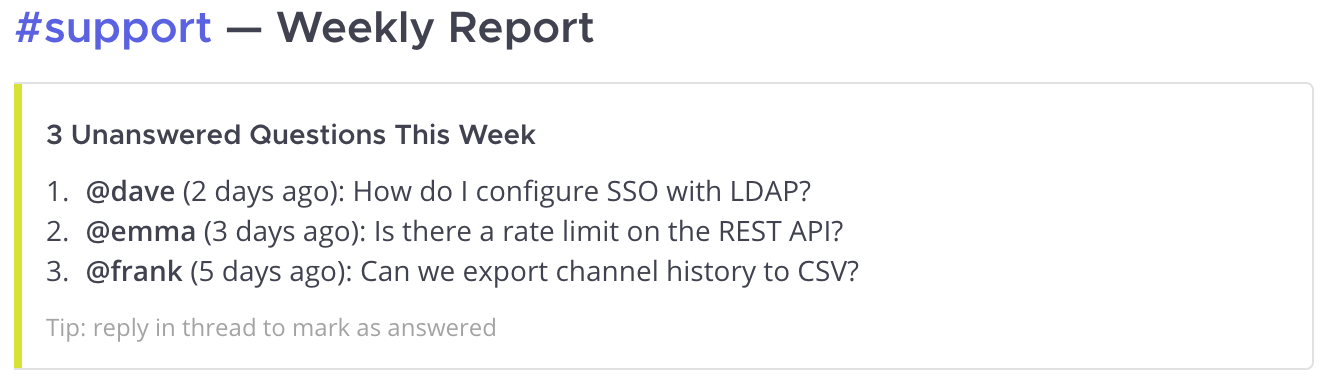
The AI searches for questions, checks each thread for replies, and posts a report highlighting what still needs attention:
How it works
Tools used:
search_messages— find messages with questions in #supportget_thread— check each thread for repliespost_message— post summary with unanswered items
Example attachment payload:
{
  "channel_id": "support-channel-id",
  "message": "",
  "attachments": [{
    "color": "warning",
    "title": "3 Unanswered Questions This Week",
    "text": "1. **@dave** (2 days ago): How do I configure SSO with LDAP?\n2. **@emma** (3 days ago): Is there a rate limit on the REST API?\n3. **@frank** (5 days ago): Can we export channel history to CSV?",
    "footer": "Tip: reply in thread to mark as answered"
  }]
}
Release Announcement
"We just shipped v2.1.0. Check the last week of #dev and #bugfixes, then post release notes to #releases"
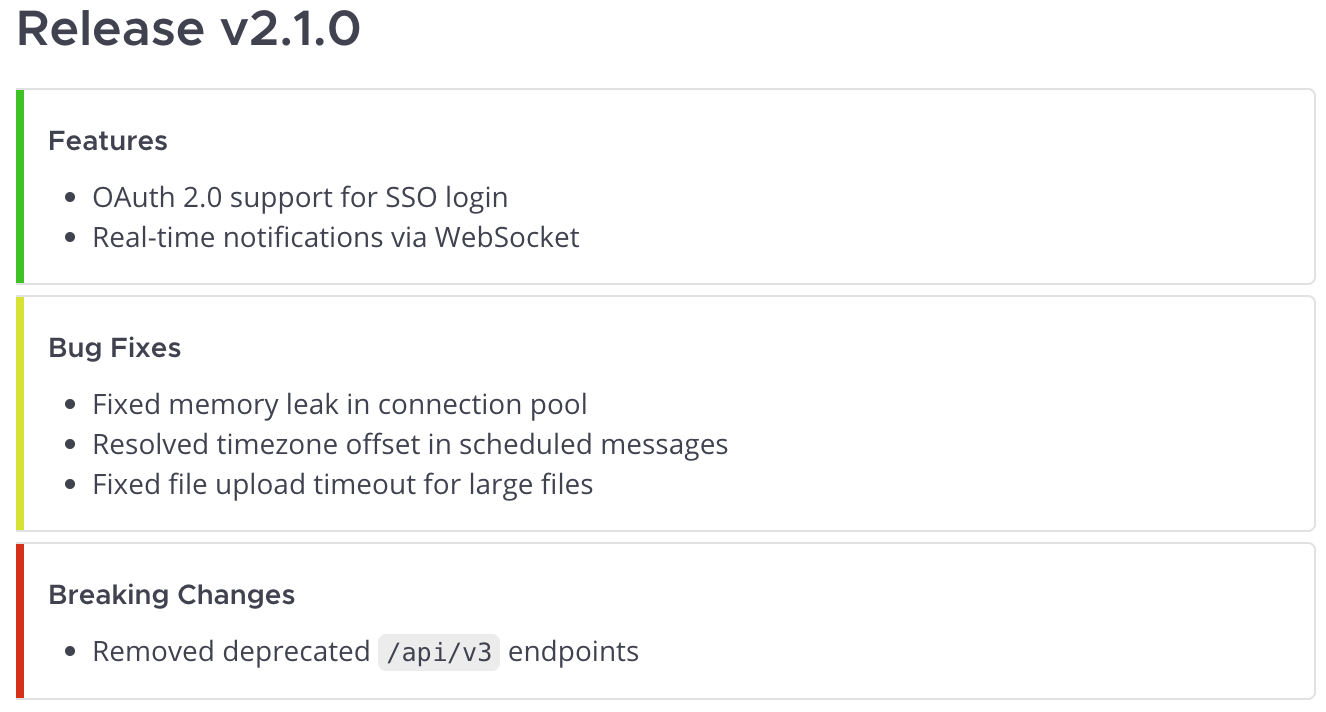
The AI gathers changes from team conversations and assembles structured release notes — grouped by category, each with its own color:
How it works
Tools used:
get_channel_by_name— find #dev and #bugfixes channelsget_channel_messages— read last week of messages from bothpost_message— post categorized release notes to #releases
Example attachment payload:
{
  "channel_id": "releases-channel-id",
  "message": "## Release v2.1.0",
  "attachments": [
    {
      "color": "good",
      "title": "Features",
      "text": "- OAuth 2.0 support for SSO login\n- Real-time notifications via WebSocket"
    },
    {
      "color": "warning",
      "title": "Bug Fixes",
      "text": "- Fixed memory leak in connection pool\n- Resolved timezone offset in scheduled messages\n- Fixed file upload timeout for large files"
    },
    {
      "color": "danger",
      "title": "Breaking Changes",
      "text": "- Removed deprecated `/api/v3` endpoints"
    }
  ]
}
Morning Catch-Up
"What did I miss? Give me a rundown of my unread channels."
The AI lists every channel with unread messages, then for each one fetches the precise
unread window — not just the last N posts. It uses last_viewed_at as the read marker
and unread_only=true for deterministic ordering:
Tools used:
list_my_channels—only_unread=truereturns only channels with unread messages, each enriched withunread_msg_count,mention_count,unread_msg_count_root,mention_count_root, andlast_viewed_at.get_channel_messages—unread_only=truefetches the unread window for each channel via Mattermost's/posts/unreadendpoint. The AI passeslimit_after=200to retrieve up to 200 unread posts per channel; iftruncatedcomes back True, more exists beyond the window.
The AI prioritizes channels by mention_count first, then by total unreads. For each
channel it groups the returned posts by root_id to surface threads alongside their root
context posts (which Mattermost auto-includes). Nothing is posted to Mattermost; the
digest stays in your conversation with the AI.
Bot Monitor Loop
"Watch a set of channels and react to new messages on a schedule, without re-processing what's already handled."
A bot account polls Mattermost on an interval and processes new posts. Two patterns, pick the one that matches your reliability requirements.
Pattern A — simple (recommended for most bots)
Use unread_only to fetch new posts, then mark_channel_viewed to advance the read
marker. Mattermost handles the bookkeeping; the bot stays stateless.
Tools used:
list_my_channels(only_unread=True)— channels with new messages.get_channel_messages(channel_id, unread_only=True)— the unread window.mark_channel_viewed(channel_id)— clear unread after processing.
Loop:
for ch in list_my_channels(team_id, only_unread=True):
    if ch.last_viewed_at == 0:
        mark_channel_viewed(ch.id)        # one-time bootstrap on a fresh channel
        continue
    posts = get_channel_messages(ch.id, unread_only=True, limit_after=200)
    handle(posts)
    mark_channel_viewed(ch.id)
Trade-offs:
- Best fit for a dedicated bot account (no human shares the unread badge).
- A post that arrives between
get_channel_messagesandmark_channel_viewedis marked as viewed without being handled. For most bots this race window is too small to matter; on very busy channels or when no message can be lost, use Pattern B.
Pattern B — at-least-once (when losses are unacceptable)
Use since with a watermark stored outside Mattermost. The bot processes everything
modified after the watermark, deduplicates by post.id, and advances the watermark
only after a successful handler.
Tools used:
list_my_channels— discover channels.get_channel_messages(channel_id, since=watermark)— everything new or edited since the last successful run.
Loop:
# Persistent across restarts — file, Redis, DB.
watermarks: dict[ChannelId, int]
processed: set[PostId]

for ch in list_my_channels(team_id):
    last_seen = watermarks.get(ch.id, 0)
    result = get_channel_messages(ch.id, since=last_seen)
    for post in result.posts.values():
        if post.id in processed:
            continue
        if post.delete_at != 0:
            continue                       # skip tombstones from deleted posts
        handle(post)
        processed.add(post.id)
    if result.posts:
        watermarks[ch.id] = max(p.update_at for p in result.posts.values())
When to choose this:
- A missed message is a real problem (alert handling, audit trail, etc.).
- The bot shares an account with a human — Pattern A would clear their unread badge.
- The bot needs to see edits and deletions of older posts, not just new ones.
Things to know:
sincereturns up to 1000 posts; onresult.truncated == Truepoll more often or step the watermark forward in smaller windows.- System posts (
typestarts with"system_") and edits of older posts come back too — filter or process them based on what the bot is for.
Daily Channel Digest
"Catch me up on #backend — what happened while I was away?"
The AI reads recent channel history, groups messages by topic, and returns a summary directly to you:
Tools used:
get_channel_by_name— find #backend channelget_channel_messages— fetch recent messages
The AI then analyzes the messages and responds with a structured summary — decisions made, open questions, and action items. No message is posted to Mattermost; the summary stays in your conversation with the AI.
Project Kickoff
"Set up a channel for Project Phoenix — private, invite @alice, @bob and @carol, and post a welcome message with the project goals"
A single prompt triggers a chain of 7+ tool calls:
Tools used:
create_channel— create private channelproject-phoenixget_user_by_username— look up @alice, @bob, @carol (3 calls)add_user_to_channel— invite each user (3 calls)post_message— post welcome message with project goals
The AI handles the entire workflow: channel creation, user lookup, invitations, and the welcome post — all from one sentence.
Thread Follow-up
"Check if anyone replied to my question about the API migration in #backend, and if not — ping the team"
The AI checks context and decides what to do:
Tools used:
search_messages— find your original questionget_thread— check if anyone replied
If no replies: the AI posts a reminder in the same thread using
post_message with root_id, keeping the conversation organized.
If replies exist: the AI summarizes the responses for you instead.
Want consistent results?
Configure your AI with workspace context and automate recurring workflows. See best practices →